Embed the editor. Render at scale.
A partner embeds the Lega editor in their own site, drives it from their code, turns one template into many on-brand creatives, and pulls every output back over the API. Inside Lega, the same engine powers bulk creation from any design.
- Partner site (B2B)
- Trust & control
- Inside Lega (B2C)
What you're looking at
An editor partners can embed
One script tag or @lega/embed/react. The partner's code loads templates, sets values, exports and renders through typed calls, and gets events back.
Templates with rules
Text with length limits that shrink or truncate to fit, plus gradient backgrounds, product images, accent colours and an optional brand logo on every output.
Locked to the partner's domains
The browser refuses to show the editor anywhere else. Sessions last at most an hour, can't be reused from another site, and each app has a kill switch.
Bulk creation in Lega
Any design becomes a template: fields come from layer names, then you fill rows or paste a CSV. The same render engine runs behind both products.
Three rows, one call
These are the actual server renders from the batch in the video: one template, a different gradient, image and accent per row, with the logo top-left. The long headline shrank to fit its box.
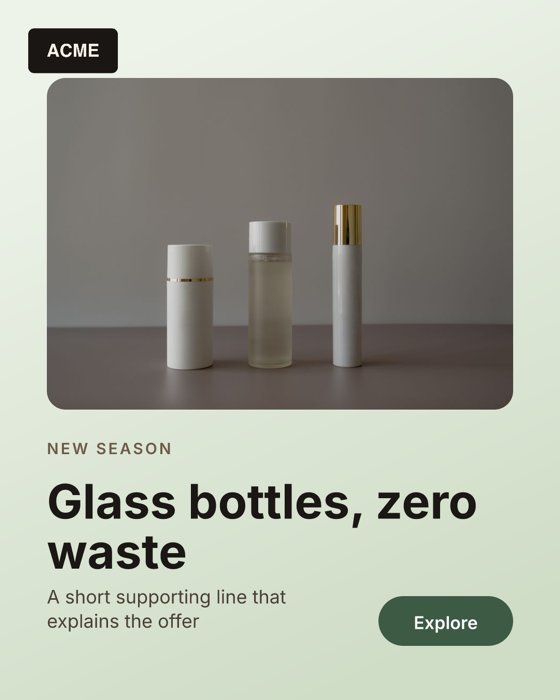
SKU-101 · linear gradient, green accent
SKU-102 · radial gradient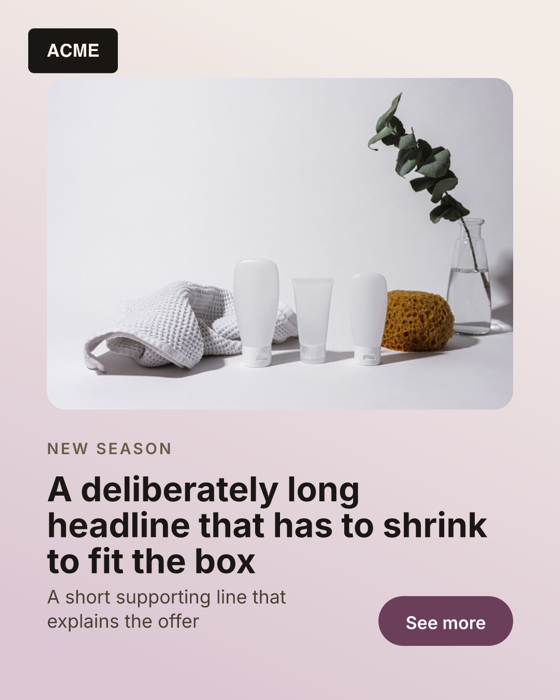
SKU-103 · long headline shrunk to fitGetting the creatives back
# every creative collected under a project
curl https://www.lega.design/api/v1/projects/acme-summer-demo/outputs \
  -H "Authorization: Bearer lk_…"

# → { "outputs": [ { "id", "url", "externalRef": "SKU-101",
#                    "width": 1080, "height": 1350, "status": "completed" } ],
#     "nextCursor": null }

# one batch, with per-row status
curl https://www.lega.design/api/v1/renders/<batchId> \
  -H "Authorization: Bearer lk_…"

# render with a gradient, an image and the logo
curl -X POST https://www.lega.design/api/v1/renders \
  -H "Authorization: Bearer lk_…" -H "Content-Type: application/json" \
  -d '{ "templateId": "…", "projectKey": "acme-summer-demo",
        "logo": { "url": "https://…/logo.png", "position": "top-left" },
        "rows": [ { "externalRef": "SKU-101", "values": {
          "title": "Glass bottles, zero waste",
          "product": "https://…/bottles.jpg",
          "background": "linear-gradient(160deg, #eef3ea, #cfdcc6)" } } ] }'
- Projects group everything a partner creates, whether from the API, the embed or a batch. Pass any
projectKey. - Gradients are plain CSS strings:
linear-gradient(…)orradial-gradient(…). - Logo takes a URL plus a corner, or
"tenant"to use the partner's branding logo. - Webhooks send a signed
render.batch.completedevent when a batch finishes. - Everyone in the demo is a placeholder brand (“Acme”). The product photos are from Pexels.